Appearance
Go Package
迁移、备份包到其他环境
位置:/root/go/pkg
区分包和独立应用程序
独立应用程序使用 main 包。 包(库)使用不同的名称
main 包指示程序将生成独立的可执行程序
使用go.mod 管理依赖
- 初始化模块
go mod init example.com/module_name
- 更新依赖管理文件go.mod
go mod tidy
- 更新所有依赖
go get -u ./...
- 更新到指定版本
go get github.com/example/package@v1.2.3
发布Package
- 在github创建仓库,权限选择默认,仓库名可以设置为包名
- 拉取仓库并初始化
go
go mod init github.com/Aliuyanfeng/testpackage- 编写代码
test.go
go
package testpackage

// Hello returns a greeting.
func Hello() string {
	return "Hello Everyone !"
}

// Glass returns a useful phrase for world travelers.
func Glass() string {
	// See http://www.oocities.org/nodotus/hbglass.html.
	return "I can eat glass and it doesn't hurt me."
}

// Go returns a Go proverb.
func Go() string {
	return "Don't communicate by sharing memory, share memory by communicating."
}

// Opt returns an optimization truth.
func Opt() string {
	// Wisdom from ken.
	return "If a program is too slow, it must have a loop."
}- 推送代码 打tag版本 用于管理被引入的版本
go
git tag -a v0.1.0 -m "publish package"
git push origin v0.1.0- 引入和使用包.
import github.com/Aliuyanfeng/testpackage
离线依赖
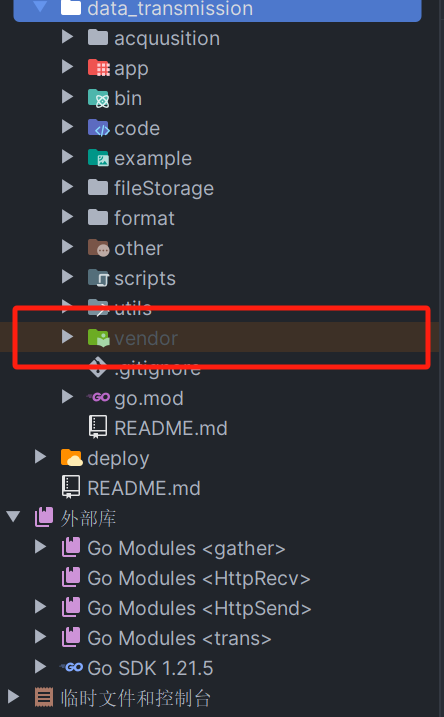
离线场景下开发编译, 执行命令可在项目根目录生成vendor目录,如果本地存在了vendor,在 go build 编译时优先级最高会在该目录找依赖库,其次是在 mod cache在找依赖库.
执行命令go mod vendor,可在项目根目录下看到生成的vendor目录